The extension Reminder allows users to keep track of pages by creating reminders for a particular date. By default, the wiki sends out a notification one week before and on the day that was set in the reminder.
Setting a reminder
To create a reminder:
- Click Set reminder in the page tools. A dialog window opens.

Page tools - Enter the reminder data.
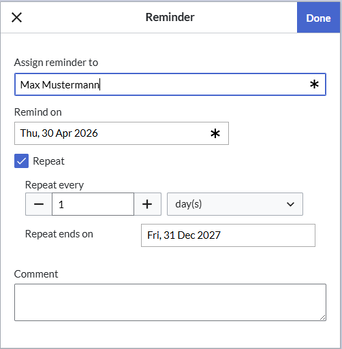
Reminder dialog window - Click Done.


My reminders
To manage your own reminders:
- Open your user menu.
- Select Reminders form the Personal Tools menu.

User menu - Edit or delete your reminders by clicking on the edit or delete icons at the end of each reminder.

My reminders


Managing all wiki reminders
The Special:Reminder page is available to wiki administrators. It displays a list of all reminders for all sites and all users. Wiki admins can delete reminders here or edit the due date and other details. Users in the admin role can theoretically create reminders for other users. This ability should be used with caution, however, as users may not expect others to create reminders on their behalf.
Notifications
By default, users receive a notification in the wiki and via email 6 days before and on the due date. This behavior can be customized in the user preferences.
User preferences
- Default reminder period: Prefills the date field for reminders with current date + x days specified here.
- Set reminder on page creation: When you create a new page, a reminder for that page is automatically created based on the default reminder period.
- Do not create reminder for the following namespaces: Excludes namespaces from the automatic reminder if "set reminder on page creation" is activated.



